


Buying web hosting, domains, and setting up business emails seems like a very confusing set of steps and decisions for a newbie. And having so many different options for domain registration and web hosting doesn’t make the choices any easier.
You might start by searching for a domain name, only to find yourself looking at add-ons like domain privacy, SSL certificates, and various extension options. Then there’s the question of hosting – shared, managed, VPS – each with different features and price points. Before you know it, you’re comparing dozens of plans and trying to figure out what you actually need.
It’s tempting to just grab a bundle that includes everything and call it a day. And for many people, that’s actually a smart move. Bundling your domain, hosting, and email together can save time and simplify management.
The key is to look beyond the first-year price. Many providers offer attractive introductory rates, but renewal prices can jump significantly after that initial period. It’s worth checking what you’ll actually pay long-term and making sure the features included in your plan match what your website needs.
The good news? There are plenty of transparent, reliable providers out there who make this process straightforward, like HostWP.io, which simplifies registering domains, creating business emails, and buying web hosting, all from a single platform. The best part is that they don’t hike prices on renewals and don’t try to upsell you anything. You just need to know what to look for.
We wrote this guide to break down the real pros and cons of keeping your web services together. We will also explain what happens when you split them up. This will help you make the right choice for your specific website.
If you manage or sell domains through WordPress, the Domain For Sale WordPress plugin can help you create professional domain-sale landing pages and collect buyer inquiries from your own website.
Table of Contents
Understanding the Three Main Parts of a Website
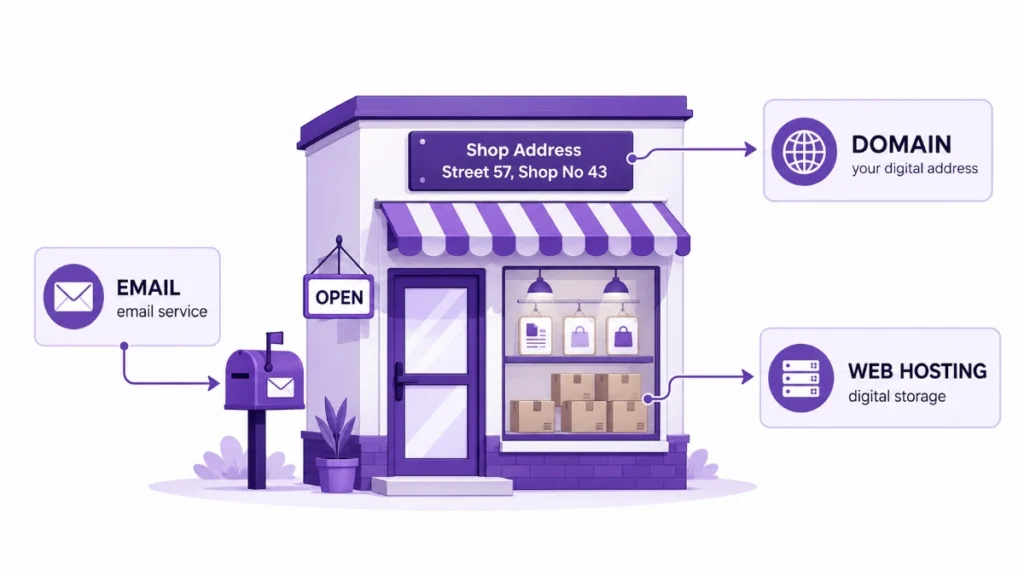
Before we compare the setups, we need to make sure we all understand the basic terms. It helps to think of your website like a physical store.
What is a Domain Name?
Your domain name is your street address. It is the text people type into their browser to find you. Examples include yourbusiness.com or yourshop.net. You do not actually own a domain name. You just rent the right to use it for a year or more.
What is Web Hosting?
Web hosting is the physical land and building where your store sits. It is the server space where all your website files, images, and databases live. When someone types in your domain, the hosting server sends your website files to their screen.
What is Email Hosting?
Email hosting is your digital mailbox. It is the service that stores your emails and lets you send and receive messages. While some web hosts include basic email, dedicated email hosting provides better security, more storage, and better spam protection.
Now that we know the basics, let us look at what happens when you bundle them all together.
The Pros of Keeping domain hosting and email together
Hosting providers like HostWP.io are refreshingly transparent about what’s included in their plans. You get modern hardware and software like LiteSpeed Enterprise, with no hidden surprises. If you’re just starting out and want expert support plus a quick way to launch your WordPress site, HostWP.io is a great choice.
Unified Customer Support
Imagine your website goes offline. You also cannot access your email. If everything is with one company, you only have to make one phone call.
You talk to one support team. They can see your entire account. They can fix the domain, the hosting, and the email all at the same time. You do not have to explain the problem to three different companies.
Simple Billing and Management
The biggest benefit is convenience. When you use one company, you get one single dashboard. You can see all your services in one place.
You also get just one bill each year. You do not have to remember three different renewal dates. You just log in, pay one invoice, and everything stays active. This saves a lot of time and mental energy.
Easier Technical Setup
Connecting a domain to a hosting server requires changing DNS settings. DNS is like the phonebook of the internet. It tells the domain where the hosting is located.
When you buy both from the same company, this step is done for you automatically. The domain is already pointing to the hosting. You do not have to copy and paste any confusing codes. You just click a few buttons and your site is live.
Better Integration and Speed
Modern hosting companies build their systems to work perfectly together. When your domain and hosting are on the same network, the connection is very fast.
Many top-tier providers use advanced technology like LiteSpeed servers.
LiteSpeed Enterprise is a very fast web server software. When your domain and hosting are integrated on a LiteSpeed server, your website loads incredibly fast. You get the benefit of high performance without having to configure complex network settings yourself.
The Cons of Keeping Everything in One Place
While the all-in-one setup is very convenient, it is not perfect. There are some serious drawbacks you need to consider before you commit.
The Single Point of Failure Risk
This is the biggest danger of keeping everything together. If your single provider has a major problem, you lose everything at once.
Imagine the company has a server crash. Your website goes offline. Because your email is hosted there too, you stop receiving emails. If they lock your account for a billing dispute, you lose your domain, your site, and your email all at the same time. You are completely cut off from the internet.
Vendor Lock-In
When a company knows you have your domain, hosting, and email with them, they have a lot of power. If they decide to raise their renewal prices next year, you are in a tough spot.
Moving just a website is easy. But moving your domain and your historical emails is very hard. You might feel forced to pay the higher prices just to avoid the massive headache of migrating everything. This is called vendor lock in.
Security Risks
If a hacker guesses the password to your main account, they get full control over your entire digital life. They can change your domain settings. They can delete your website files. They can read your private emails.
Having all your eggs in one basket means one security mistake can ruin your whole business.
The Pros of Splitting Them Up
Because of the risks mentioned above, many experienced website owners choose to split their services. They buy their domain from one company, their hosting from another, and their email from a third.
Here is why this strategy is so popular among professionals.
Better Performance and Specialized Features
When you split your services, you can pick the absolute best provider for each specific need, but it often comes with a premium price. You can choose a host that specializes in high-speed WordPress sites.
You can choose an email provider that has the best spam filtering in the world. You do not have to settle for a good enough bundle. You get top tier performance in every single category.
Enhanced Security
Splitting your services spreads out your risk. If your web hosting company gets hacked, your domain and your email are still safe.
You can log into your domain registrar and point your site to a new host. Your business emails keep flowing. Your customers can still reach you. This setup gives you a massive safety net.
Freedom to Choose the Best Prices
Domain prices change all the time. One company might have a great sale on domain registrations this year. Another company might have the cheapest web hosting.
When you keep them separate, you can shop around for the best deal on each service. You are not forced to buy a bundle just to get a discount. You have total freedom to optimize your budget.
Easier to Sell or Transfer
Sometimes you might want to sell your website to someone else. If your domain, hosting, and email are all tangled up in one personal account, it can be messy to hand over.
When they are separate, you just transfer the domain and the hosting files to the buyer. You keep your email account and your personal data. It makes business transactions much cleaner.
The Cons of Splitting Them Up
Splitting things up gives you more control, but it also gives you more responsibilities. It is not for everyone.
Complex DNS Management
We mentioned earlier that keeping things together makes DNS setup easy. When you split them, you have to do it manually.
You have to log into your domain company. Then you have to find the DNS settings. Then you have to copy the nameservers from your hosting company and paste them in. If you make a typo, your website will not load. It can be frustrating for beginners.
Multiple Bills and Renewal Dates
Instead of one easy payment, you now have three different bills. You might have to pay for your domain in March, your hosting in July, and your email in October.
If you forget to pay for one of them, that specific service will stop working. You have to be much more organized to keep track of your expenses.
The Blame Game with Support Teams
This is the most annoying part of splitting services. Let us say your website goes offline.
You call your web host. They check their servers and say everything is fine. They tell you to call your domain registrar. You call the domain registrar. They say the domain is pointing correctly. They tell you to call your email host.
Nobody wants to take responsibility. You get bounced around from company to company while your site remains broken. It can waste hours of your time.
Comparison Table: All in One vs. Split Setup
To help you see the differences clearly, we put together a quick comparison table.
| Feature | All in One Setup | Split Setup |
| Initial Setup | Very Easy and Automatic | Requires Manual DNS Setup |
| Monthly Management | Simple, One Dashboard | Complex, Multiple Logins |
| Billing | One Single Invoice | Multiple Invoices and Dates |
| Customer Support | One Team for All Issues | Blame Game Between Companies |
| Performance | Good, Depends on the Bundle | Excellent, Best in Class for Each |
| Security Risk | High, One Hack Ruins Everything | Low, Risk is Spread Out |
| Flexibility | Low, Locked to One Provider | High, Change Providers Anytime |
| Best For | Beginners, Agencies and Small Businesses | Large Enterprises |
How to Decide What is Best for You
Now that we have looked at all the pros and cons, how do you actually make the choice? The right answer depends entirely on your experience level and your business size.
When to Keep Everything Together
If you are just starting your first website, keep everything in one place. You have enough to worry about without learning how to manage DNS records.
Small local businesses also do very well with an all-in-one setup. If you just need a simple site and a few email addresses for your staff, a bundled package is perfectly fine. It is cheap, easy, and gets the job done.
If you choose this route, make sure you pick a highly reputable company. Do not just pick the cheapest option. Read reviews about their customer support and their server uptime.
When to Split Them Up
If you are running a large business or an online store, you should split your services. When your website makes money every single minute, you cannot afford to have everything go down at once.
Digital agencies and web developers should also split things up. You need the freedom to move clients to different hosts based on their specific needs.
If you are using heavy applications or high-traffic platforms, split your services. You need the specialized performance that comes from picking the best host for your specific software.
Best Practices for Managing Your Setup
No matter which path you choose, there are some rules you should always follow. These tips will keep your website safe and running smoothly.
Always Turn on Auto Renewal
The fastest way to lose your website is to forget to pay your bill. If your domain expires, someone else can buy it immediately.
Go into your account settings right now and turn on auto-renewal for every service you own. Make sure the credit card on file is up to date. This one step saves you from massive disasters.
Keep Secure Backups
If you keep everything in one place, you must have external backups. Do not rely only on your host to save your files.
Use a backup plugin to send a copy of your website to a cloud storage service like Dropbox or Google Drive. If your host deletes your account by mistake, you can restore your site in minutes.
Use Strong and Unique Passwords
Never use the same password for your domain, your host, and your email. If a hacker cracks one password, they will try it on all your accounts.
Use a password manager to create long, random passwords for every service. Turn on two-factor authentication everywhere it is available. This adds a second lock to your digital doors.
Document Your Login Details
If something happens to you, does anyone else know how to access your website? Keep a secure, encrypted document with all your login details.
Share this document with a trusted business partner or family member. If your site crashes and you are unavailable, someone else needs to be able to log in and fix it.
Final Thoughts on Your Website Setup
Building a website is a big step for any business. One of your first major choices is where to manage your domain, web hosting, and email.
Keeping everything in one place is all about convenience. You get a single login, one clear bill, and much less technical headache. It is the perfect starting point for beginners who want to focus on their work instead of troubleshooting server settings.
This is exactly why many site owners prefer all-in-one solutions like HostWP.io. They provide domain registration, fast hosting, and professional email under one roof. You just sign up, connect your domain, and start building without jumping between different companies.
Just make sure you pick a provider that offers real speed, strong security, and responsive support. When your foundation is solid, your website can grow without the usual stress.