



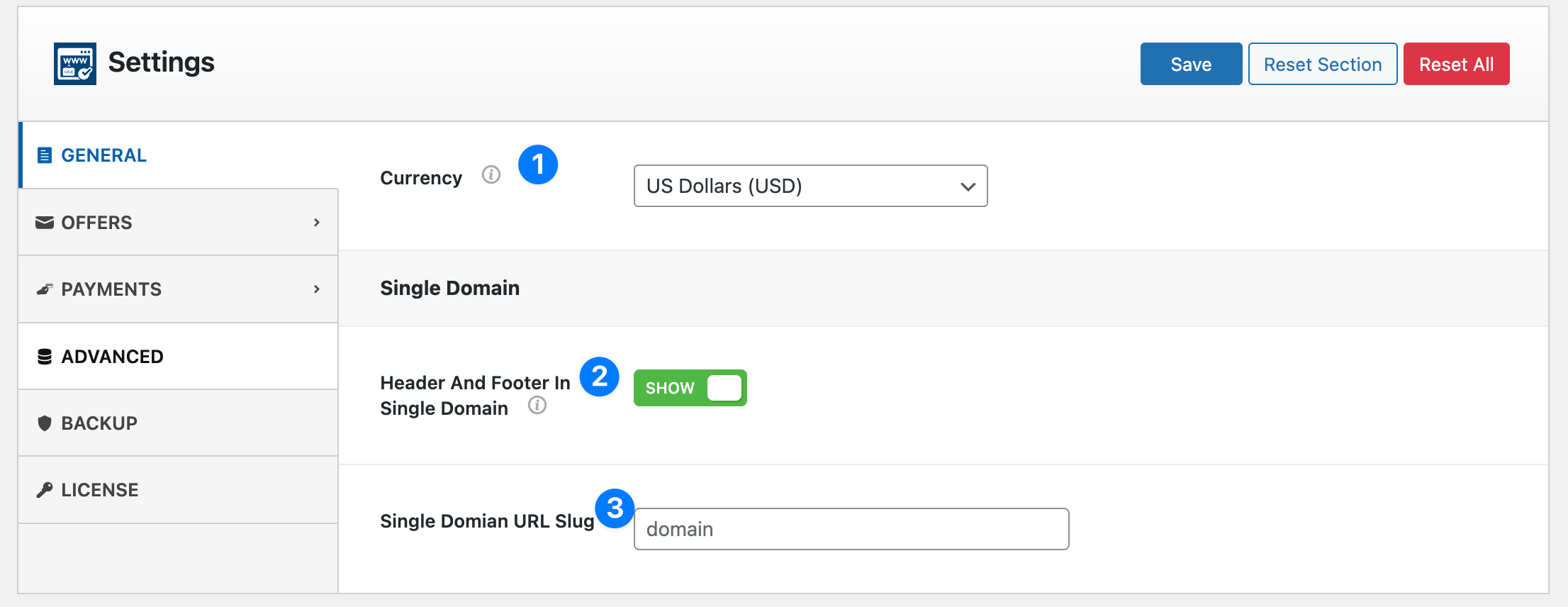
The General Settings section allows you to configure the global behavior of the Domain For Sale plugin. These settings control the default currency, single domain page behavior, and URL structure used for domain landing pages.
You can access these settings from: Domain For Sale → Settings → General
1. Currency #
Select the default currency used for domain prices and offers across the plugin.
Example:
US Dollars (USD)
This currency will be applied to:
- Domain fixed prices
- Offer amounts submitted by buyers
- Price tags displayed on domain landing pages
- Escrow payment amounts (if enabled)
Choose the currency that matches your primary marketplace or target buyers.
2. Header and Footer in Single Domain #
This option controls whether your website’s theme header and footer appear on the domain landing page.
Show (Enabled)
- Displays the site’s normal header and footer.
- The domain page will look consistent with the rest of your website.
Hide (Disabled)
- Removes the theme header and footer.
- Displays a clean standalone landing page focused only on selling the domain.
This is useful when:
- You want a distraction-free domain sales landing page
- You are forwarding a domain directly to the landing page
- You want higher conversion for domain buyers
3. Single Domain URL Slug #
This option defines the URL structure used for individual domain landing pages.
Example slug:
domain
If your website URL is:
https://example.com
Then a domain landing page would appear like this:
https://example.com/domain/yourdomain.com
Changing the slug allows you to customize the URL structure to better match your website.
Example alternatives:
domains
sale
buy-domain
⚠ Important: After changing the slug, you may need to refresh WordPress permalinks by visiting:
Settings → Permalinks → Save Changes
This ensures the new URL structure works correctly.
✅ Tip: Use a clean slug like domain or domains to keep your URLs short, readable, and SEO-friendly.


