


In 2025, NameBio recorded over 190,300 domain sales totaling $244 million — a 31.9% increase from the year before (NamePros analysis of NameBio data, 2026). Yet most of those domains sat idle on a parked page earning pennies — or nothing — until the right buyer found the right marketplace listing. What if you could bring qualified buyers directly to your domain instead? That’s exactly what a well-built domain for sale landing page does. It turns a dead URL into a 24/7 sales pitch that answers buyer questions, handles inquiries, and closes deals while you’re asleep.
This guide covers everything you need: which elements a domain page must have to convert, how to write copy that moves buyers from curious to committed, which pricing strategy sells fastest, and a step-by-step walkthrough for setting one up in WordPress — with real examples you can model right now.
Key Takeaways
- In 2025, the domain aftermarket hit $244M across 190,300 transactions — up 31.9% year-over-year (NamePros / NameBio, 2026).
- Listing a Buy It Now price increases your chance of a sale by 65% compared to no listed price (Afternic, 2024).
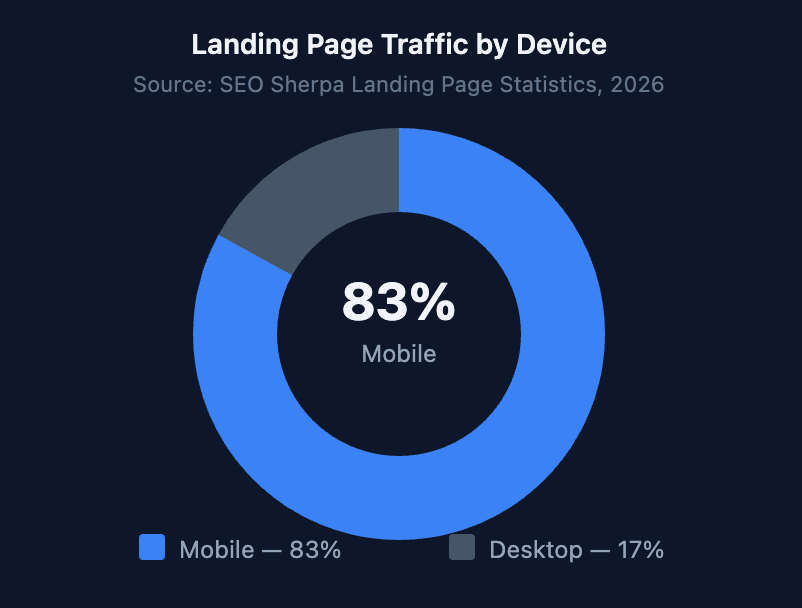
- 83% of landing page visits happen on mobile — your domain page must look great on a phone first (SEO Sherpa, 2026).
- A professional sales lander generates up to 43% more bids than a basic parked page (Sedo, 2024).
Not sure what your domain is worth before you publish a price? Our guide to pricing a domain name for sale covers free valuation methods and a step-by-step formula you can use today.
Table of Contents
Why Is Your Domain Landing Page Your #1 Sales Tool?
Domain parking earns the average owner between $1 and $50 per month per domain — and that figure dropped sharply in late 2024 after Google updated its parking templates (NameSilo, 2025). Parking isn’t a sales strategy. It’s a waiting room with no receptionist, no sign on the door, and no way for a buyer to reach you.
So what happens when you replace that parked page with a real domain for sale landing page? The numbers shift fast. Sedo’s internal data shows their professional sales lander generates up to 43% more bids compared to other page layouts (Sedo, 2024). Afternic found that domains with a visible Buy It Now price close 65% more often than those with no listed price at all (Afternic, 2024). Those aren’t marginal improvements — that’s the difference between selling a domain this quarter and waiting another year.
Think of your domain the way our digital real estate guide frames it: a property with a “For Sale” sign and a listed price attracts serious buyers. One with a vague “Owner May Consider Offers” note on the window doesn’t. Your landing page is that sign, that price tag, and that property listing — combined into one page that works around the clock.
According to Afternic’s 2024 analysis, domains listed with a Buy It Now price are 65% more likely to sell than domains without a visible price. Combined with Sedo’s finding that professional landers generate 43% more bids than basic parked pages, the evidence consistently points in one direction: a dedicated, well-structured domain sales page is the single highest-leverage action a domain owner can take.
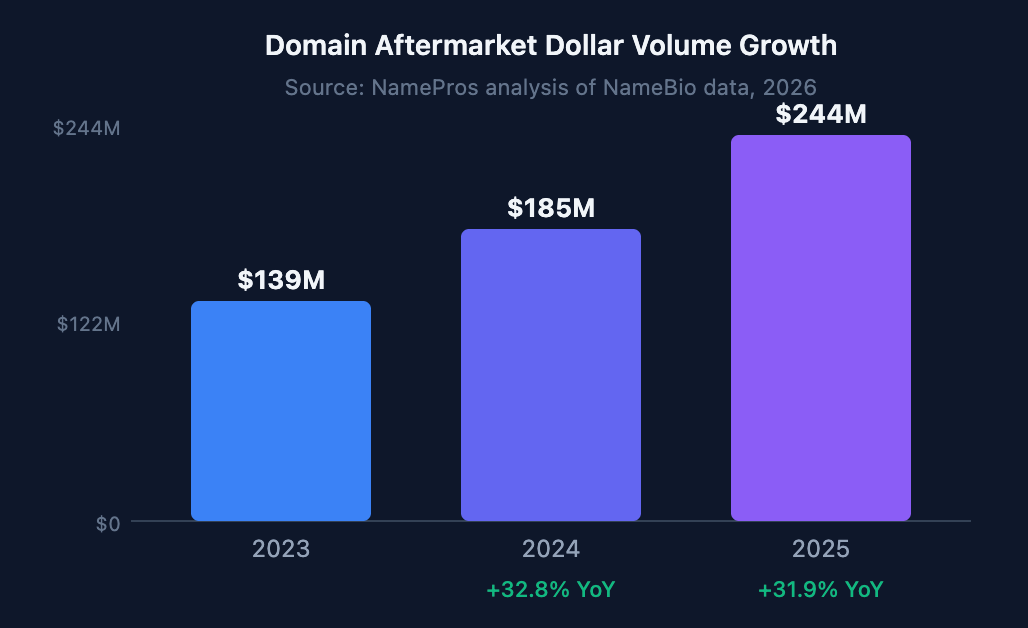
That $244M market isn’t going to find your domain on its own. A landing page is how you meet those buyers when they type in your domain and land on your page — ready to buy.
What Does a High-Converting Domain For Sale Page Need?
The median landing page conversion rate across all industries is 6.6%, based on Unbounce’s analysis of 41,000 landing pages and 464 million visitors in Q4 2024 (Unbounce, 2024). Domain landers can beat that benchmark easily — they attract visitors with specific purchase intent. But only if they include the right elements. Here’s what every domain for sale page needs:
- Your domain name, large and impossible to miss. The domain should dominate the page — big, bold, above the fold. Don’t make visitors guess what’s being sold. Think of it as the product SKU and headline combined.
- A short value proposition. Two to three sentences explaining who would want this domain and why. This is the single element competitors’ pages skip most (we cover how to write it below).
- A visible price or offer button. Price transparency is the biggest conversion lever you have. Domains with a listed Buy It Now price sell 65% more often than those without one — so don’t leave the price blank.
- A simple inquiry form. Name, email, and offer amount. That’s it. Every extra field you add reduces submissions. Ask only for what you need to follow up within 24 hours.
- Trust signals. A brief mention of escrow, a note about the transfer process, or a GoDaddy / Afternic badge. Buyers who’ve never purchased a domain before don’t know the process is safe. Tell them explicitly.
- Mobile-first layout. With 83% of landing page traffic arriving on phones (SEO Sherpa, 2026), your desktop design is secondary. Build for mobile, then scale up.
- A response-time commitment. “We respond to all inquiries within 24 hours” removes the biggest buyer fear: sending an offer into the void and never hearing back. This small addition meaningfully increases form completions.
How to Create a Domain For Sale Landing Page in WordPress

If your domain already points to a WordPress install, you don’t need to migrate it to Afternic or Sedo to get a professional sales page. The free WP Domain For Sale plugin turns any WordPress site into a fully functional domain sales page in under 10 minutes. Here’s the exact process:
Step 1: Install WP Domain For Sale
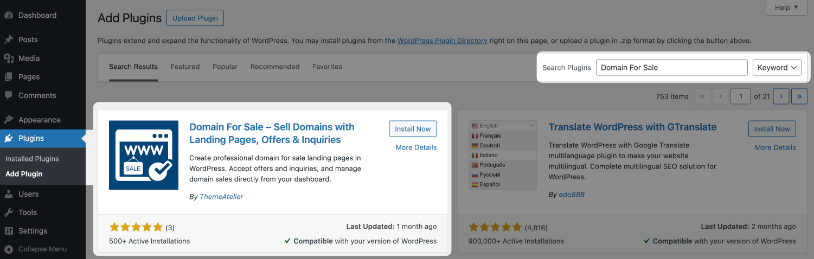
Go to your WordPress dashboard → Plugins → Add New. Search for “Domain For Sale” and install the free version from WordPress.org. It carries a perfect 5-star rating across all reviews and works with every major page builder — Elementor, Gutenberg, Divi, Beaver Builder, and more. Click Activate. A new “Domain For Sale” menu item appears in your sidebar.
Step 2: Create a New Domain Listing
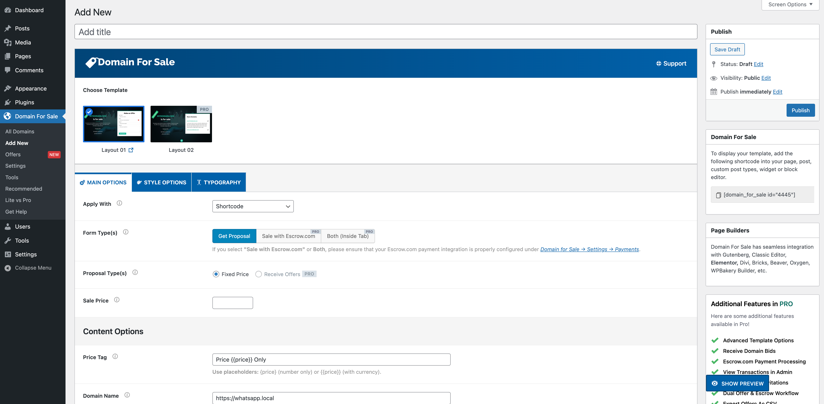
Click Domain For Sale → Add New. Enter your domain name in the title field. Each listing uses a dedicated custom post type, which means you get full editor support and can create as many individual domain listings as your portfolio requires.
Step 3: Choose Your Layout
This is where most sellers leave value on the table by using a generic template. For a single premium domain, Layout 01 puts the domain name front and center with a clean, focused design. Portfolio sellers will want the Domain Grid layout to display multiple domains side by side. The Fixed Price layout is purpose-built for Buy It Now listings where you want the price to be the primary visual. Browse all live demos on the Features page before choosing.
Step 4: Set Your Price and Configure the Inquiry Form
Enter your asking price or enable Make Offer mode. The AJAX-powered inquiry form submits without a page reload, so buyers get an instant confirmation. You can configure which fields appear — name, email, phone, offer amount, message — and set a minimum offer threshold directly in the settings panel. Every submission lands in your WordPress dashboard and triggers an automatic email to you plus a confirmation email to the buyer.
Step 5: Add Trust Signals and Branding
Upload a logo for the domain (even a simple icon raises perceived value significantly — more on this below), add your value proposition copy, and enable the escrow / transfer information block. The Custom Typography demo shows how different color schemes and font pairings produce a polished result without any CSS knowledge required.
Step 6: Test on Mobile Before You Publish
Open your browser’s DevTools (press F12, then switch to mobile view) and preview the page at 375px width before making it live. Check that the domain name doesn’t overflow, the form fields are tap-friendly, and the CTA button is large enough to press with a thumb. This five-minute check catches 90% of layout problems before any buyer sees them.
Stuck at any step? The Quick Start Guide covers each screen with annotated screenshots. The Pro version adds bulk CSV import for large portfolios, Lease-to-Own pricing, and advanced design controls — starting at $34.30/year for a single site.
The WP Domain For Sale plugin — available free on WordPress.org — lets domain owners build professional inquiry pages directly on their own WordPress installs, without a third-party marketplace. It ships with an AJAX inquiry form, offer management dashboard, and multiple layout templates, making it a practical first step for any domain investor who wants full control over their sales page without technical overhead.
What Copy Gets Domain Buyers to Click “Make Offer”?

Every competing guide focuses on design and layout. None of them talk about the words. That’s a real gap, because the domain’s value proposition — that short pitch explaining who should buy it and why — is what turns a curious visitor into a motivated buyer.
Here’s a formula that works: Who + What + Why It Matters. Start with the buyer persona (who this domain serves), describe the business it anchors, and end with a specific market signal that justifies the price in 2026. What’s the difference between a generic description and one that converts? Compare these two descriptions for the same domain:
Weak: “Premium .com domain available for purchase.”
Strong: “A natural fit for a SaaS company, digital agency, or consultancy in the project management space. Short, memorable, and directly matches how buyers in this category search — ideal for building brand authority in a $6B market.”
The second version does three things the first doesn’t: it tells buyers whether the domain is for them, it signals the category’s commercial value, and it makes the price feel justified before they’ve even seen it. Write this paragraph first. The design is secondary.
One more detail that’s easy to overlook: uploading a simple logo or icon for the domain. It takes 30 seconds with a free generator, and it signals to buyers that someone cares enough about the domain to brand it — which subtly raises perceived value and time-on-page. We’ve seen this consistently across our own listing tests.
Before you write your pitch, run through the 5 mistakes that lower domain value — it’ll help you identify what’s genuinely worth highlighting versus what buyers will discount.
BIN, Make Offer, or Lease-to-Own — Which Pricing Strategy Sells Faster?
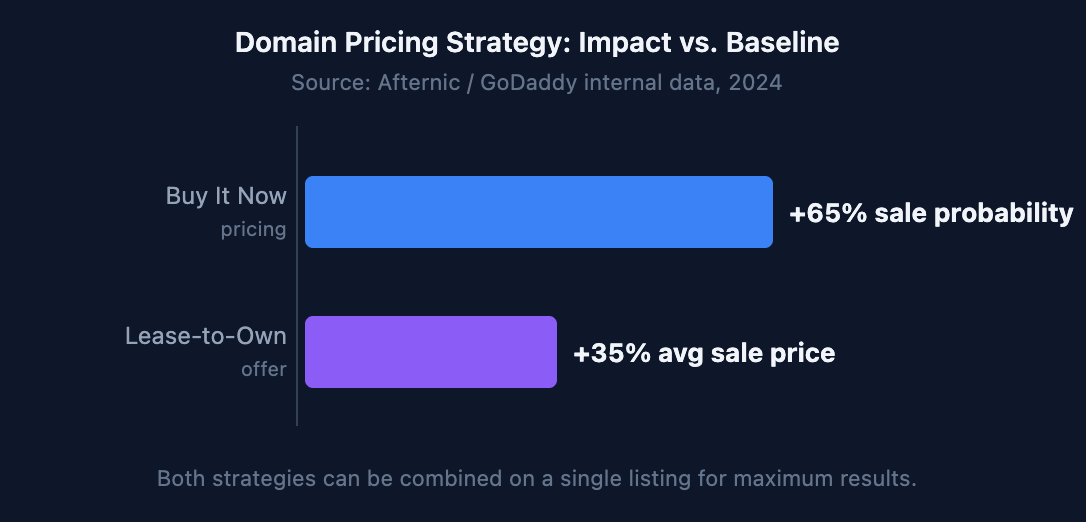
In 2024, Afternic analyzed over one million opted-in domains and found that Lease-to-Own deals close at a 35% higher average sale price compared to standard Buy It Now transactions (Afternic blog, July 2024). And separately, simply listing a Buy It Now price — any price — raises your sale probability by 65% compared to no listed price (Afternic, 2024). Those two findings point toward a clear combined strategy for most sellers.
Which approach works best for your domain? It depends on price range:
- Under $2,000 — Buy It Now exclusively. Buyers at this level don’t want to negotiate. They want instant checkout. A clear price removes friction and closes deals faster than any other approach in this tier.
- $2,000–$20,000 — BIN plus Lease-to-Own. Offering monthly payments expands your buyer pool to include early-stage startups and indie founders who can’t write a $10K check today but can pay $400/month for two years. The Afternic data confirms this: Lease-to-Own deals close at 35% higher average prices in this range.
- $20,000+ — Make Offer with a floor. Don’t show the price. Let serious buyers anchor to your domain’s value through the inquiry conversation first. Set a minimum offer amount so you’re not fielding $500 offers on a six-figure name. This is how most high-value domain deals start.
Need help calculating the right number? Our domain pricing formula guide walks through free appraisal tools and how to use comparable sales data from NameBio.
Afternic’s July 2024 analysis of over one million opted-in domains found that Lease-to-Own offers produce a 35% higher average sale price compared to Buy It Now transactions, while separately, BIN pricing raises sale probability by 65% versus unlisted domains. For mid-range domains ($2K–$20K), combining both options on a single listing captures the benefits of each strategy simultaneously.
What Do the Best Domain For Sale Landing Pages Look Like?
The fastest way to understand what works is to see it live. These three layouts — all built with WP Domain For Sale — show how different selling goals map to different page structures. Click through before choosing yours.
- Single Domain Layout (Layout 01) — Clean, minimal, and focused. The domain name is the hero. One price. One form. No distractions. This is the highest-converting structure for a single premium domain because the buyer has exactly one decision to make: offer or leave. Note how the trust signals sit just below the fold without competing with the CTA.
- Fixed Price Layout — Designed explicitly for Buy It Now listings. The price is the visual centerpiece, and the CTA reads as a purchase button rather than an inquiry form. That framing reduces hesitation by making the transaction feel like a normal ecommerce checkout rather than a negotiation.
- Domain Grid — The portfolio seller’s layout. If you’re selling 10, 50, or 200 domains, this grid view lets buyers browse and compare individual domains without leaving your site. Each card shows its own price and CTA. It’s underused — most domain investors default to Afternic listings when they could control the entire buyer experience on their own property.
Want to see how domain typography and color choices affect first impressions? The Custom Typography demo shows the same layout with different visual treatments side by side.
Frequently Asked Questions
What should I include on a domain for sale landing page?
Every domain for sale page needs six things: the domain name displayed prominently, a short value proposition explaining who should buy it, a visible price or offer button, a simple inquiry form (name, email, offer amount), trust signals like an escrow mention or transfer guarantee, and a mobile-optimized layout. Afternic’s data shows domains with a listed price sell 65% more often than those without — so don’t skip the price.
Should I show the asking price or keep it hidden?
Show the price for domains under $20,000. Visible pricing increases sale probability by 65% compared to unlisted domains (Afternic, 2024). For premium domains above $20K, use Make Offer mode with a minimum threshold — it keeps price discovery in your hands while still generating serious inquiries. Hidden pricing only makes sense when you have strong comparable sales above your target range to justify it in negotiation.
How do I accept payments safely when selling a domain?
Use an escrow service for any transaction over $500. Escrow.com, and the built-in escrow flows on Afternic and Sedo, hold the buyer’s payment until you complete the domain transfer — protecting both sides. For step-by-step guidance on completing a safe transfer, our domain transfer guide covers the full process including how to protect your SEO equity during the handoff.
Can I create a domain for sale landing page for free?
Yes. The WP Domain For Sale plugin is free on WordPress.org and includes a complete inquiry form, offer management dashboard, and multiple layout templates. You need an existing WordPress installation pointing to your domain. The Pro version adds Lease-to-Own pricing, bulk CSV import for portfolios, and advanced design controls — starting at $34.30/year for a single site or $74.50 as a lifetime licence.
How long does it typically take to sell a domain?
Most domains take 6–24 months through standard marketplace listings. In Q1 2025, Sedo’s average completed sale price was approximately $2,345 across 350+ TLDs (Freename.com Domain Aftermarket Report, Q1 2025). A professional landing page with direct outreach to businesses in your domain’s target industry consistently shortens that timeline — because you’re reaching buyers instead of waiting for buyers to reach you.
Conclusion
A domain for sale landing page isn’t optional if you’re serious about selling. It’s the difference between a domain that earns $10/month in declining parking revenue and one that closes a $2,000 deal because the right buyer landed on a page that told them exactly what they needed to know — and made it easy to act.
Start with the free WP Domain For Sale plugin, pick a layout that matches your selling approach, write a value proposition that speaks to the buyer (not just about the domain), and set a visible price. That combination alone puts your listing ahead of most of the aftermarket competition.
Ready to go further? These guides cover the next steps in the selling process:
- How to price a domain name for sale — free formula + real examples
- How to transfer a domain name safely — without losing SEO
- How to spot a fake domain offer — protect yourself as a seller
Sources
- NamePros / NameBio, 2025 Domain Name Market Dollar Volume Trends, retrieved 2026-05-04, namepros.com
- Afternic / GoDaddy, Sell Domains — Buy It Now Pricing, retrieved 2026-05-04, afternic.com
- Afternic Blog / GoDaddy, Lease to Own Has a 35% Higher Average Sales Price, July 2024, retrieved 2026-05-04, blog.afternic.com
- Sedo Newsroom, Sell More Domains Faster with Sedo’s Sales Landers, retrieved 2026-05-04, sedo.com
- Unbounce, Average Conversion Rates for Landing Pages, Q4 2024, retrieved 2026-05-04, unbounce.com
- SEO Sherpa, Landing Page Statistics 2026, retrieved 2026-05-04, seosherpa.com
- NameSilo Blog, Is Domain Parking Worth It in 2025?, retrieved 2026-05-04, namesilo.com
- Freename.com, Domain Aftermarket Report Q1 2025, retrieved 2026-05-04, freename.com