


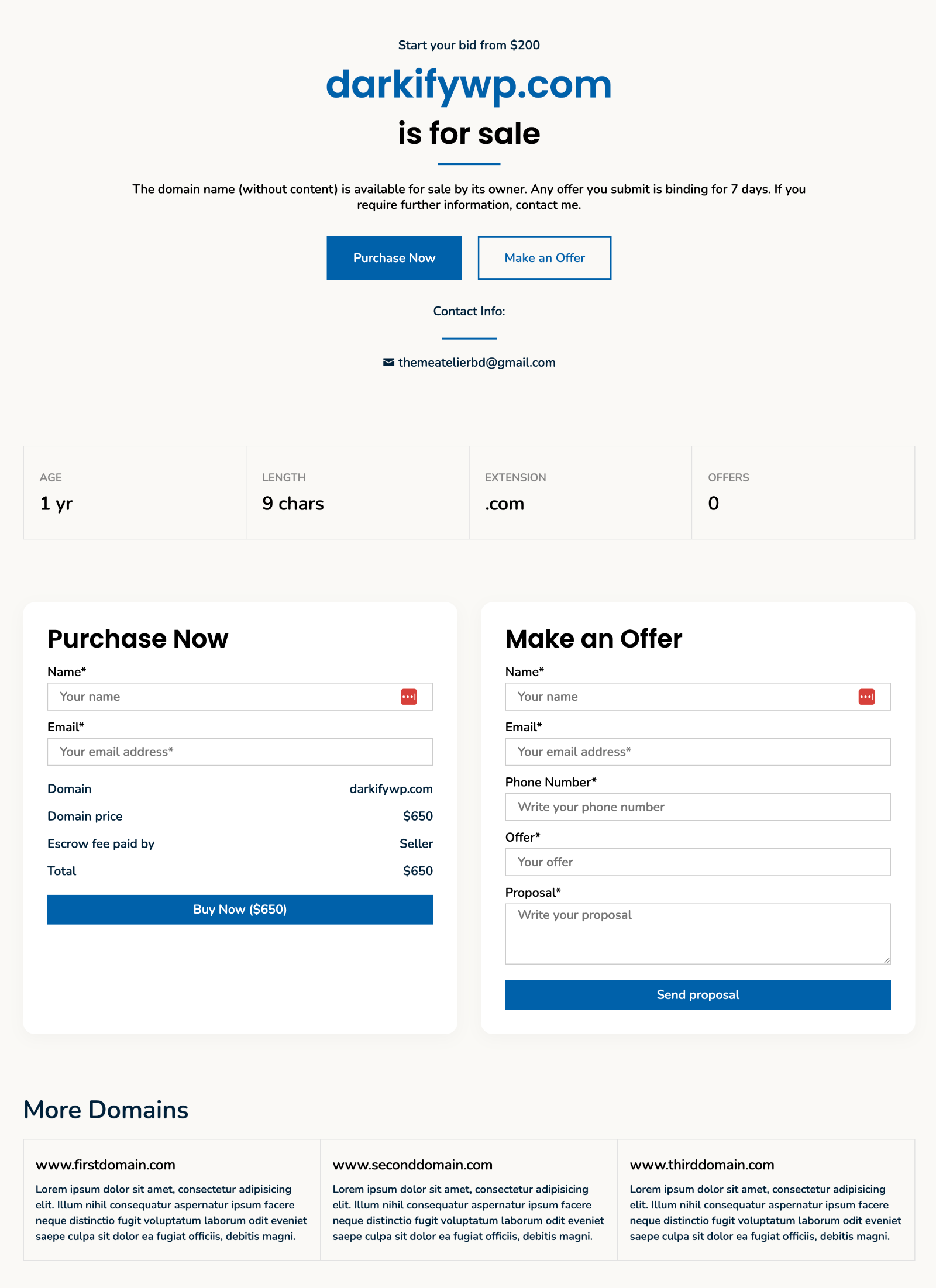
A modern, full-width domain landing page template with a prominent hero section, domain stat cards, built-in inquiry / offer forms, and a “More Domains” showcase block.
Overview #
Layout 03 is the third single-domain template available in Domain For Sale Pro. It is designed for sellers who want a clean, content-focused landing page that puts the domain name front and centre, supports Escrow.com direct-purchase flows, and surfaces key domain attributes (age, length, TLD) without clutter.
How to activate: Edit any domain (DFS Template), open the Layout metabox, and choose Layout 03 from the template selector. Save the post.
Page Sections #
Section 1 — Hero
Displays the price tag or offer tag, the domain name in large typography, the sale title, body content, CTA buttons, and contact info.
Section 2 — Optional – Domain Attributes
A row of stat cards showing selected domain attributes: age, character length, TLD extension, offer count, or a custom value.
Section 3 — Forms
Card-based layout containing the Purchase Now (Escrow) form and/or the Make an Offer form, depending on your Form Options setting.
Section 4 — Optional – More Domains
A repeatable block to cross-link related domains that you also have for sale.
Domain Attributes #
Add one or more attribute rows in the Domain Attributes repeater. Each row renders as a stat card in the attributes section.
| Type | Displays | Source |
|---|---|---|
age | Domain age in years (e.g. 8 yrs) | RDAP lookup, cached 24 h |
length | Label character count (e.g. 6 chars) | Computed locally |
extension | TLD (e.g. .com) | Computed locally |
offer_count | Number of recorded offers for this domain | Database query |
custom | Any text you enter in the Custom Value field | Manual |
Domain Age via RDAP: Layout 03 automatically queries rdap.org for the domain’s registration date and caches the result for 24 hours. If the lookup fails, set a manual fallback year in the Registered Year field (layout_03_registered_year). The fallback is used only when RDAP returns no data.
More Domains Block #
Use the More Domains repeater to add cross-links to other domains you are selling. Each entry accepts:
- Title — domain name displayed as a link.
- Link URL + Target — destination URL and whether it opens in a new tab.
- Content — short description shown below the domain link.
Forms Integration #
Layout 03 uses the same form engine as all other templates:
- Make an Offer form — always available when
form_optionsincludesget_proposalorboth. - Escrow / Buy Now form — shown when Escrow.com is fully configured (API key, Escrow email, and Sell Price all set). Administrators see a setup notice when configuration is incomplete; visitors see the offer form as a fallback.
Frequently Asked Questions #
Can I use Layout 03 with the free version? #
No. Layout 03 is a Pro-only template. An active Domain For Sale Pro license is required.
The domain age shows “Unknown” — what should I do? #
The RDAP lookup may have failed or the domain’s registry does not publish creation dates publicly. Enter a manual year in the Registered Year field in the Domain Attributes section to override the lookup result.
How do I hide the Domain Attributes section? #
Leave the Domain Attributes repeater empty. The entire section is only rendered when at least one attribute row exists.
How do I hide the More Domains section? #
Leave the More Domains repeater empty. The section will not render.
Can I change the hero background image per domain? #
Yes. Each DFS Template post has its own Background Image field. Upload a different image for each domain.


